似乎是大部分人都会遇到的问题,删除 namespace 时,namespace 一直处于 Terminating 状态,无法删除。
需要通过 API 强制删除 namespace,以下是解决方法。
1、查看处于 Terminating 状态的 namespace
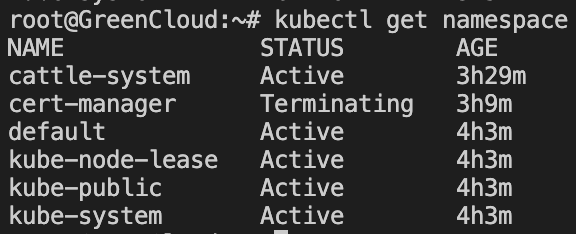
kubectl get namespace我这里是 cert-manager 这个 namespace 一直处于 Terminating 状态。
2、拿到 namespace 的描述
输出到 tmp.json 文件中:
cd /root/
kubectl get namespace cert-manager -o json > tmp.json
文件内容:
{
    "apiVersion": "v1",
    "kind": "Namespace",
    "metadata": {
        "annotations": {
            "kubectl.kubernetes.io/last-applied-configuration": "{\"apiVersion\":\"v1\",\"kind\":\"Namespace\",\"metadata\":{\"annotations\":{},\"name\":\"cert-manager\"}}\n"
        },
        "creationTimestamp": "2024-09-13T09:17:19Z",
        "deletionTimestamp": "2024-09-13T11:51:03Z",
        "labels": {
            "kubernetes.io/metadata.name": "cert-manager"
        },
        "name": "cert-manager",
        "resourceVersion": "8322",
        "uid": "b15a240c-xxxx-xxxx-xxxx-xxxxxxxxxxxx"
    },
    "spec": {
        "finalizers": [
            "kubernetes"
        ]
    },
    "status": {
        "conditions": [
            {
                "lastTransitionTime": "2024-09-13T12:24:08Z",
                "message": "All resources successfully discovered",
                "reason": "ResourcesDiscovered",
                "status": "False",
                "type": "NamespaceDeletionDiscoveryFailure"
            },
            {
                "lastTransitionTime": "2024-09-13T12:24:08Z",
                "message": "All legacy kube types successfully parsed",
                "reason": "ParsedGroupVersions",
                "status": "False",
                "type": "NamespaceDeletionGroupVersionParsingFailure"
            },
            {
                "lastTransitionTime": "2024-09-13T12:24:08Z",
                "message": "Failed to delete all resource types, 6 remaining: the server has received too many requests and has asked us to try again later, the server was unable to return a response in the time allotted, but may still be processing the request, the server was unable to return a response in the time allotted, but may still be processing the request, the server was unable to return a response in the time allotted, but may still be processing the request, the server was unable to return a response in the time allotted, but may still be processing the request, the server was unable to return a response in the time allotted, but may still be processing the request",
                "reason": "ContentDeletionFailed",
                "status": "True",
                "type": "NamespaceDeletionContentFailure"
            },
            {
                "lastTransitionTime": "2024-09-13T12:24:08Z",
                "message": "All content successfully removed",
                "reason": "ContentRemoved",
                "status": "False",
                "type": "NamespaceContentRemaining"
            },
            {
                "lastTransitionTime": "2024-09-13T12:24:08Z",
                "message": "All content-preserving finalizers finished",
                "reason": "ContentHasNoFinalizers",
                "status": "False",
                "type": "NamespaceFinalizersRemaining"
            }
        ],
        "phase": "Terminating"
    }
}
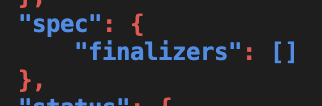
3、将文件中的 finalizers 值设置为空列表
这里就不演示了,编辑删除即可。
4、通过 API 强制删除 namespace
curl -k -H "Content-Type:application/json" -X PUT --data-binary @tmp.json http://localhost:8001/api/v1/namespaces/cert-manager/finalize如果你的请求返回了:
{
  "kind": "Status",
  "apiVersion": "v1",
  "metadata": {},
  "status": "Failure",
  "message": "the object provided is unrecognized (must be of type Namespace): couldn't get version/kind; json parse error: unexpected end of JSON input (\u003cempty\u003e)",
  "reason": "BadRequest",
  "code": 400
}
那么就是你的请求命令出错了,出现了类似
--data-binary前的--变成了—的情况,需要手动进行修正。
5、查看 namespace 是否已删除
kubectl get namespace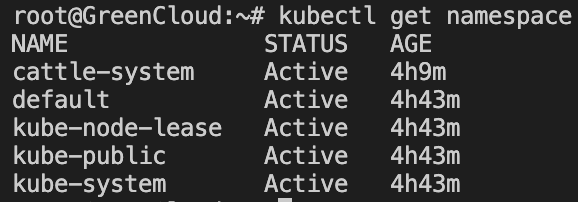
大功告成。